Home
  • English
  • Italian

Main navigation

  • Home
  • Light
  • Pro
  • Free Tools
    • PickMeApp Relocator
    • PickMeApp Installer
  • Downloads
  • News
  • Support
    • User manual
    • FAQ
    • Forum
    • Search
  • Log in

8.4. Advanced options

  1. User manual
  2. OLD MANUAL
  3. 8. CONFIGURATION
  4. 8.4. Advanced options

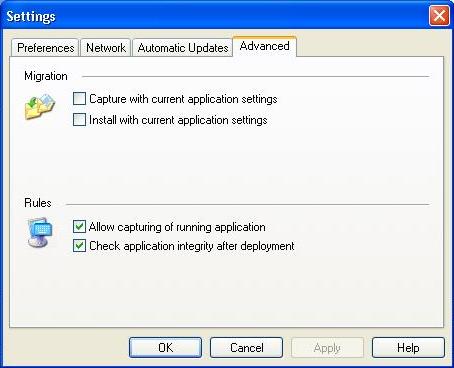
You can enable capture and installation of an application with the current custom user settings. This is an experimental feature.

To make application capture safer you can disable capturing of applications that are currently run.

To make an installation process quicker you may disable a PickMeapp checking integrity of installed applications.
Note: some of applications are fixed automatically by PickMeApp during that test.

  • Printer-friendly version

Navigation

  • @1 INTRODUCTION
  • @2 SETTING UP PICKMEAPP PRO
  • @3 USING PICKMEAPP PRO
  • @4 MANAGING INSTALLED PROGRAMS
  • @5 MANAGING INSTALLATION PACKAGES
  • @6 MANAGING YOUR OWN INSTALLATION PACKAGES COLLECTION
  • @7 PICKMEAPP PRO COMMAND LINE INTERFACE
  • @8 PICKMEAPP LIGHT
  • @9 PICKMEAPP INSTALLER
  • @10 TROUBLESHOOTING ISSUES IN PICKMEAPP
  • @11 OPTIMIZING PICKMEAPP
  • OLD MANUAL
    • 1. GETTING STARTED WITH PICKMEAPP
    • 2. PICKMEAPP SETUP
    • 3. USING PICKMEAPP
    • 4. CAPTURING AN APPLICATION
    • 5. DEPLOYING A CAPTURED APPLICATION
    • 6. PICKMEAPP AS APPLICATION MANAGER
    • 7. PICKMEAPP LIGHT
    • 8. CONFIGURATION
      • 8.1. User Interface Preferences
      • 8.2. Network Preferences
      • 8.3. Automatic Updates configuration
      • 8.4. Advanced options
      • 8.5. PickMeApp Command Line Interface
    • 9. TROUBLESHOOTING
    • 10. PICKMEAPP AS SOFTWARE UPDATER
    • 11. RELOCATE INSTALLED SOFTWARE TO ANOTHER DRIVE
    • 12. PickMeApp as Application Launcher

Footer

  • Privacy
  • Company
  • Terms & Conditions
  • Contact us

Copyright © 2026 PickMeApp.com